


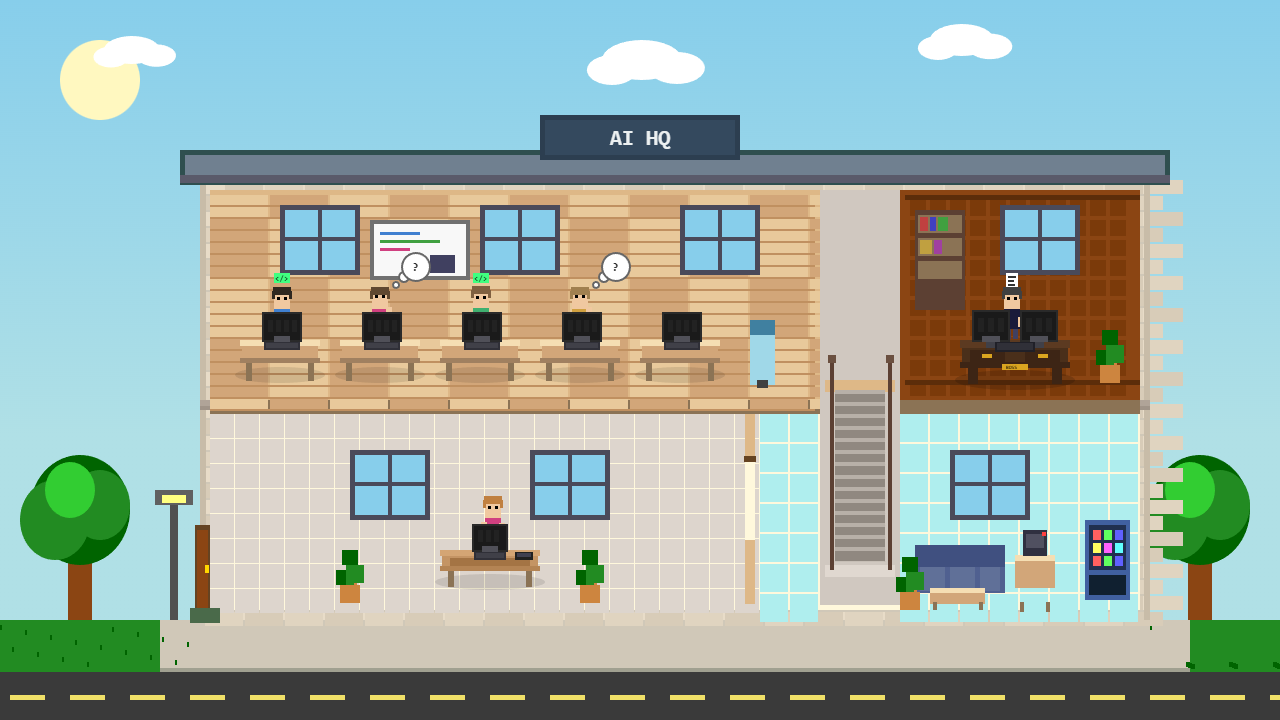
I built a real-time visualization tool that displays active Claude Code sessions as characters working in a virtual office. Each session gets its own workspace, and activity updates live as Claude uses different tools.
The Concept
When running multiple Claude Code sessions across different projects, it’s easy to lose track of what’s happening. I wanted a heads-up display that would show me at a glance which sessions are active and what they’re doing, all without switching between terminals.
The result is AI HQ: a browser-based visualization where each Claude Code session is represented by a character at a workstation. The character’s actions reflect what Claude is actually doing in real-time.
How It Works
The system uses Claude Code hooks (PreToolUse and PostToolUse) to send events to a local Node.js server via WebSocket. The server maintains state for each session and broadcasts updates to any connected browser clients.
When Claude starts using a tool, the hook fires and sends the tool name and session ID to the server. The visualization updates immediately:
- Edit, Write, Bash: Character typing
- Read, Grep, Glob: Character thinking
- No activity for 15+ seconds: Character idle
Architecture
The stack is intentionally minimal:
- Node.js server with WebSocket support (ws package)
- Vanilla JavaScript frontend with HTML5 Canvas
- PowerShell hook scripts that POST events to the server
No frameworks, no build process. Just start the server and open the browser. The visualization is network-accessible, so you can display it on a secondary monitor or another machine entirely.
Session Management
Each Claude Code instance gets a unique session ID. The visualization tracks:
- Session title (pulled from working directory)
- Current state (typing, thinking, idle)
- Active tool being used
- Time since last activity
A session panel displays all connected sessions with their current status, making it easy to monitor multiple projects simultaneously.
Use Cases
Beyond the novelty, this is a fun solve for a real workflow problem. When you’re running Claude Code on multiple projects at once, this gives you ambient awareness without constantly switching contexts.
It’s also useful for demonstrations. When showing Claude Code to others, having a visual representation of what’s happening makes the AI’s work more tangible than watching terminal output scroll by.
Get It
The project is open source: github.com/jaysonbrush/ai-hq
Setup takes about five minutes. Install dependencies, configure the Claude Code hooks, and you’re running.
